
Nine arms, one honest ladder: the Ergotron LX is still the default answer in 2026, the HX carries the ultrawide heavyweights, HUANUO’s FlowLift owns the under-$50 tier outright, and the dead weight — a vanished WALI, a resale-only HUANUO single, the defunct Jarvis arm — has been cleared out. Every pick below was verified in stock through a named seller on August 16, 2026, and every retired one is documented at the bottom.
A monitor arm is the cheapest ergonomic upgrade that actually works: it lifts the screen to eye height, frees the desk under it, and ends the forward hunch that a fixed stand builds into your day. The market in 2026 sorts into a clear ladder. Ergotron still sets the reference standard — PCWorld’s current testing, updated this month, hands the brand its best-overall and best-heavy-duty awards — while HUANUO’s renamed FlowLift and TitanLift lines have made the budget tiers genuinely good rather than merely cheap, and the premium names (Humanscale, Herman Miller) compete on refinement and warranty length rather than raw capacity.
Two notes before the list. VESA compatibility — the 75x75mm or 100x100mm screw pattern on your monitor’s back — is assumed on every pick here; check your panel has it before buying any arm. And prices live in the boxes and table below, not in our text: arm pricing swings weekly, and the live boxes are the availability oracle on update day and after.
|
Best Overall

|
Best Heavy-Duty

|
Best Budget

|
Ultrawide Value

|
|
$209.69
|
$329.00
|
$47.99
|
$99.99
|
The Best Monitor Arms of 2026
Ergotron LX — Best Overall
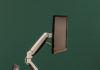
Twenty-plus years of iteration and a 10-year warranty are why the LX opens every serious monitor-arm list, ours included. It carries flat, curved and ultrawide panels to 34 inches and 25 pounds through a 13-inch height range with polished constant-force smoothness — set a screen with one hand and it stays exactly where you left it, no sag, no drift. PCWorld’s August 2026 update keeps the LX line as its best single-monitor pick, and Amazon itself was shipping the classic matte-black config at update time.
If you run a sit-stand desk or you’re tall, buy the Tall Pole variant instead — same arm on a 13¼-inch column, which keeps the screen in range when the desk rises:
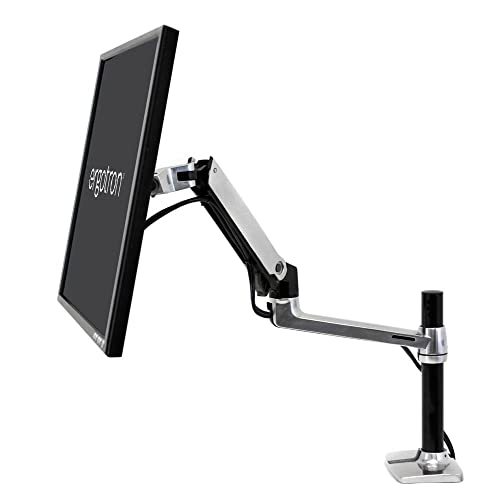
The only real argument against either is price versus the budget tier below — you are paying roughly triple the FlowLift’s money for the warranty, the resale value, and movement quality you notice every single day. Most people who buy an LX never buy another arm; that is the actual value case.
Ergotron HX — Best Heavy-Duty and Ultrawide
When the monitor is the heavy kind — a 49-inch super-ultrawide, a big high-end panel pushing 30-plus pounds — the HX is the arm the category measures against. It is rated for screens to 49 inches and 20 to 42 pounds, moves them with the same constant-force smoothness as the LX, and earns PCWorld’s best-heavy-duty award in the current 2026 test for exactly that combination: minimal plastic, robust build, no droop under loads that fold cheaper arms. At update time it was in stock through a named third-party storefront at list-typical money.
Two cautions. The lower bound of that weight range is real — an HX needs at least around 20 pounds of monitor to counterbalance correctly, so pairing it with a light 27-inch panel gives you a stiff, over-sprung arm; that pairing belongs on the LX. And its industrial mass reads as overkill on a minimal home desk. Buy it for the load, not the badge.
HUANUO FlowLift Single — Best Budget
HUANUO FlowLift Single Monitor Mount, 13 to 32 Inch Monitor Arm, Adjustable Monitor Stand, Vesa Mount with Clamp and Grommet Base - Fits 4.4 to 19.8lbs LCD Computer Monitors
- Outstanding value in the under-$50 tier
- Gas spring holds 13-32 inch panels to about 20 lbs
- Clamp or grommet install in minutes
- Bare-bones cable management
- Joints less smooth than premium arms
The budget tier has a runaway winner. HUANUO’s FlowLift single — the arm formerly sold as the HNSS6 — carries 13-to-32-inch panels up to about 20 pounds on a gas spring, installs with a clamp or grommet base in minutes, and sells for a fraction of an Ergotron while doing the ergonomic job that actually matters: screen to eye height, desk reclaimed. PCWorld names it the best single-monitor arm under $50 in its August 2026 update, and its five-digit review count on Amazon runs 4.6 stars — an extraordinary consensus for hardware this cheap. It was in stock through HUANUO’s storefront at update time.
What the money doesn’t buy: cable management is bare-bones, and the joints lack the buttery constancy of an LX — you position it, tighten it, and treat it as set-and-mostly-forget. For a standard 24-to-32-inch monitor on a normal desk, that is a trade nearly everyone should take at this price.
HUANUO TitanLift — Best Budget Ultrawide
 HUANUO TitanLift Heavy Duty Monitor Arm for Screens up to 49", Holds 44 lbs, Aluminum Ultrawide Screen Monitor Mount, Fully Adjustable Single Gaming Desk Mount with Dual C-Clamp, Max VESA 100x100...
- 49-inch / 44 lb capacity at a budget price
- Aluminum build with dual C-clamp for thin desks
- 4.7-star owner consensus
- Mechanisms stiff before break-in
- Installation takes longer than average
This is the arm that fills the gap our old WALI pick left when its listing died: heavy-duty capacity without heavy-duty pricing. The TitanLift is aluminum-built, rated for screens to 49 inches and 44 pounds — HX-class numbers — with full articulation and a dual C-clamp that spreads the load on thinner desktops. PCWorld’s testers call out its heavy-duty construction and extensive adjustment range, with the caveat that installation takes longer and the mechanisms start stiff before breaking in. Its Amazon reviews run 4.7 stars, and HUANUO’s storefront had it in stock on update day.
Against the HX it gives up the movement refinement, the 10-year warranty and the brand’s parts ecosystem — real differences if you re-position screens daily. If your super-ultrawide mostly sits still once set, the TitanLift does the holding at a third of the money.
VIVO STAND-V101G1 — Ultrawide Value, Pneumatic
VIVO’s premium aluminum single splits the difference between the budget and reference tiers: a pneumatic riser rated for ultrawides to 49 inches and 33 pounds, concealed cable channels down the pole and arm, and both clamp and grommet hardware in the box with tools included. It has been the tinkerer’s favorite in this class for years because everything is adjustable — a 3mm hex screw tunes the counterbalance clockwise for light panels, counterclockwise for heavy ones — and VIVO’s own storefront was shipping it at update time.
Its compromise is the base pole: taller than minimalists want, and the pneumatic segment adds visual bulk the Ergotrons avoid. Capacity also stops short of the true 40-pound monsters — those belong on the HX or TitanLift above.
Humanscale M2.1 — Best Premium, Best with a Dock

The M2.1 is the design-object of this list: a slim, spring-balanced arm — no gas cylinder to age out — that moves lighter screens with a precision the spec sheet can’t convey, and the only pick here that grows into a full docking workstation via Humanscale’s M/Connect base, putting USB-C and USB-A ports at desk level. PCWorld’s 2026 test slots it as the best arm with a built-in dock. For a clean executive setup where the monitor is a 15-pound panel and the desk should look like furniture, nothing else here competes.
Be clear-eyed about the fine print: capacity tops out around 15 pounds — no ultrawides — the dock is a genuinely expensive add-on, and the Amazon channel currently ships it on a roughly two-week lead time rather than from local stock. It earns its place on refinement, not value math.
HUANUO FlowLift Pro Dual — Best Budget Dual

Dual setups got cheaper and lighter in 2026, and this listing — which once sold HUANUO’s big HNDS12 — now ships the FlowLift Pro dual: two independently articulated arms for 13-to-27-inch screens on a single clamp, using the brand’s MechaSpring tension system, at pocket money for what it replaces. For the standard two-24-to-27-inch-panel workstation, it handles the job the old hardware did with less bulk and a tool-free VESA mount that makes installation a one-person task.
The honest limits: combined capacity is modest — heavy 27-inch panels at both ends push its rating — and screens above 27 inches are out entirely; a big-dual setup belongs on paired LX arms instead. Note this is a changed product on an old listing: if the box art says FlowLift Pro, you have the right item.
Mount-It! Triple — Best Triple

For the three-screen crowd, this remains the practical answer: three gas-spring arms on one base, each independently adjustable, fitting 24-to-32-inch panels with USB and audio pass-through ports built into the stand. It has held this slot through multiple updates because the formula — die-cast build, per-arm tension screws, both clamp and grommet mounting — keeps working, and the listing was in stock at normal pricing on update day.
Its constraint is per-arm capacity: around 15 pounds per screen, sized for standard office panels rather than heavy gaming displays. Load three ordinary 27s and it holds them cleanly; load three heavyweights and you want three separate arms and a stronger desk.
Amazon Basics Single Stand — Cheapest Credible

The floor of the market that we can still recommend with a straight face: Amazon’s house-brand height-adjustable arm for 13-to-30-inch screens, steel-built, with basic tilt, rotation and cable management, shipped and stocked by Amazon itself. It exists for the buyer whose whole brief is “get the laptop-companion monitor off its box of books for the least possible money” — and at that job it is fine.
Go in knowing the deal: a one-year warranty against Ergotron’s ten, movement you position rather than glide, and none of the FlowLift’s polish for only a few dollars less. We list it because it is always in stock and never a scam; we’d still spend the extra few dollars on the FlowLift above.
How We Picked
Same three rules as all our 2026 coverage. Channel health: every arm verified in stock through a named seller on update day — this page just retired three picks that failed that test. Source honesty: we anchor on published lab testing — PCWorld’s August 2026 arm roundup above all — instead of inventing test benches of our own. Fit honesty: an arm that’s wrong for your monitor’s weight is wrong entirely, so every pick names its real weight window, including the HX’s often-ignored minimum.
What Happened to Our Old Picks
- WALI GSM001XL-P — listing marked “currently unavailable” with no restock; slot inherited by the HUANUO TitanLift.
- HUANUO single (old B07X48X4KM listing) — now sold only via Amazon Resale, one used unit at a time; the FlowLift single is the same brand’s current answer.
- Ergotech Freedom Arm — the listing technically lives, but it’s a 2013-era design at TitanLift money from a brand that has faded out of the category; retired on merit.
- Jarvis Monitor Arm — Fully’s exit from the market killed this one upstream; it disappears from our “also tested” note accordingly.
- HUANUO HNDS12 dual — not dead but transformed: its listing now ships the smaller FlowLift Pro dual, reviewed above as the changed product it is.
Buying Notes: the Short Version
Dual mount or two singles? One dual-arm unit wins on desk space, installation effort and a tidy look, and it’s the default answer for two screens sitting near each other. Two single arms win when the monitors need real distance between them, when they’re large — above 27 inches, independent arms stop the panels fighting each other — or when you’re mixing different screens that want different hardware. Whichever route you take, confirm the desk itself: C-clamps need a solid edge and adequate thickness, grommet mounts need a hole and a wrench, and two separate clamps double the load points your desktop has to carry.
And the checklist that sorts every arm on this page: your monitor’s VESA pattern (75×75 or 100×100 here), its weight against the arm’s honest window — minimum as well as maximum — the height range against your desk and your spine, and the warranty, where the gap between one year and ten is most of what separates the budget tier from the reference tier.
For the homework behind these calls, our companion guide Mounting Your Monitor: How to Choose the Perfect Monitor Mount (2026) covers VESA patterns, desk compatibility and mounting styles in depth. Pairing hardware: 7 Best Monitors for Your Mac Mini M4 (2026) and The 10 best 1440p 144hz Monitors for Gaming + Buyer’s Guide.
Last updated: August 16, 2026 — full 2026 rebuild: nine-arm ladder anchored by PCWorld’s August 2026 testing, three dead or degraded listings retired and documented, two new HUANUO picks added with live-price table, and every surviving listing re-verified in stock through a named seller.